


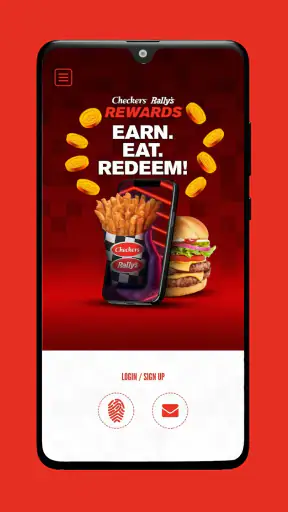
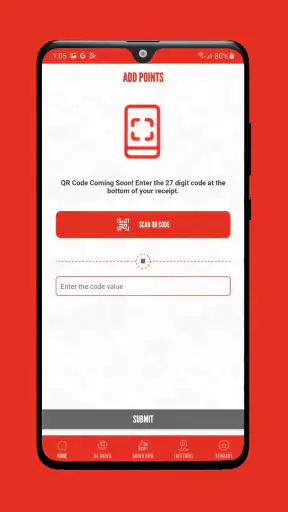
I installed Checkers & Rally's Rewards to see whether it actually makes a fast-food visit easier, rather than simply putting a restaurant menu on a phone. My starting point was a familiar one: I wanted to decide what to eat, place the order without standing in line, and make sure any available reward was used sensibly. The app is a free Food & Drink app from Checkers Drive-In Restaurants, Inc., built around rewards, advance ordering, and delivery.
That combination gives it a clear purpose. It is not trying to replace every restaurant app on your phone; it is meant for people who already choose Checkers or Rally's and want a more convenient route from craving to pickup or delivery. In my experience, the strongest part is the way it brings those steps together. The weaker part is that convenience depends heavily on your location, the restaurant's available service, and how carefully you review the order before submitting it.
From deciding what to eat to placing the order
The starting point: a quick meal with a reason to use the app
The app makes the most sense when I already know I am considering Checkers or Rally's. If I am comparing several unrelated restaurants, a general delivery service is usually a better first stop because it puts more menus in one place. Here, the benefit comes from staying inside the brand's own ordering and rewards process.
A realistic example is a busy evening when I am leaving work and want food ready rather than spending extra time at the counter or drive-thru. I can open the app, look through the available menu, decide whether ordering ahead fits the moment, and then choose between collecting the food or arranging delivery when that option is presented for the location. That is a more useful workflow than browsing a menu with no way to finish the transaction.
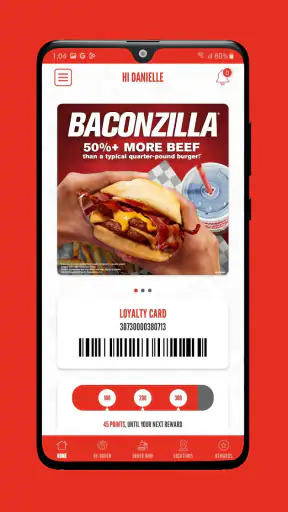
The rewards element also changes how I approach the order. Instead of treating the app as a digital menu, I check the rewards area before building the basket. This is an important habit because a reward can influence what I order, while discovering it after I have already made all my choices may mean reworking the order or missing the best use for that visit.
The app has a 4.7 average from around 24 thousand ratings, and it has passed the one-million-install mark. Those figures suggest that it has found a substantial audience, but they do not remove the need to judge it against my own routine. A popular app can still be a poor fit if I rarely visit these restaurants or if I mainly want broad delivery comparisons.
Building the order without rushing the review
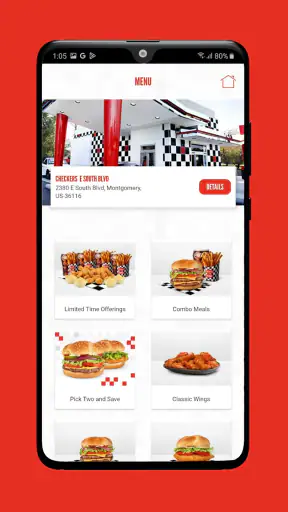
Once I choose a restaurant, I treat the menu screen as the first handoff: my intention has to become a specific order. This is where I prefer to slow down for a moment. Fast-food ordering is easy to do quickly, but speed can make it easier to overlook a selected item, an option, or the difference between pickup and delivery.
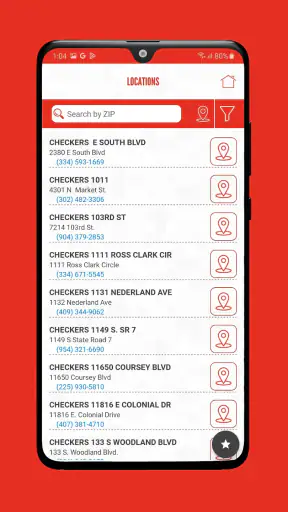
My practical approach is to choose the main items first, then inspect the basket as a separate step. I check the restaurant location, the fulfillment method, the items, and the reward before moving on. This may sound obvious, but it prevents a common app-ordering mistake: assuming that the restaurant selected at the beginning is still the most convenient one for the final handoff.
Ordering ahead is especially useful when I am passing near a restaurant but do not want to wait at the counter. The advantage is not merely that the order was placed on a phone. The real advantage is planning the handoff before I arrive. I can make the decision while stationary, then use the restaurant visit for collection instead of menu browsing and payment preparation.
Delivery serves a different purpose. It is more helpful when I cannot conveniently reach the restaurant, but it also introduces another handoff between the restaurant and the person bringing the food. I would choose pickup when timing and control matter most, and delivery when avoiding the trip matters more. That trade-off is central to using the app well.
Rewards are useful when they fit the order
The rewards system is the feature that gives this app a reason to stay installed for a regular customer. I would not automatically use the first available reward just because it appears. Instead, I look at whether it matches what I already planned to buy. A reward that forces an unwanted order can reduce the value of the visit rather than improve it.
My preferred workflow is to check rewards before selecting food, create an order that makes sense without stretching it, and then see whether applying a reward improves the result. If it does, I confirm the basket again. If it does not, I would rather keep the order simple than add food merely to feel that I used a benefit.
This is one of the app's less obvious trade-offs. Rewards can make repeat visits feel more worthwhile, but they can also encourage unnecessary purchases if I treat every available offer as a target. The app works best when the reward supports an existing meal plan, not when the reward creates the plan.
I also pay attention to the final total and the order summary after applying anything. A reward may change the composition of the basket, so the final review matters more than the initial selection screen. That extra check is a small amount of friction, but it is worthwhile because it keeps the reward from becoming an automatic, unchecked step.
The handoffs: phone, restaurant, and delivery
The app's complete promise depends on several handoffs working in sequence. First, I hand my choices to the app. Then the app hands the order to the selected Checkers or Rally's restaurant. Finally, the restaurant hands the food either to me at pickup or to a delivery process. Each transition is a possible point of confusion, so I think of the confirmation screen as more than a formality.
For pickup, I want the selected location to be the one I can reach easily after placing the order. If I am ordering from the car, I would complete the selection before driving and avoid handling the phone while moving. The app is most convenient when it removes decisions from the arrival point, not when it encourages last-second changes.
For delivery, I would double-check the destination and contact details before submitting. The app can organize the order, but it cannot make an ambiguous address convenient for the restaurant or courier. This is a good example of where the user's preparation still matters: the digital workflow may be smooth, yet the real-world handoff can fail if the final destination is not clear.
I also see a difference between an app-controlled experience and a third-party delivery alternative. With a general delivery app, I may get wider restaurant choice or a familiar delivery interface. With Checkers & Rally's Rewards, the brand-specific rewards journey is the stronger reason to use it. I would choose based on the whole outcome, not just the presence of a delivery button.
What the result feels like in everyday use
When everything lines up, the result is straightforward: I have selected food, considered a reward, chosen pickup or delivery, and completed the order without needing to repeat the process at the restaurant. That is particularly valuable for repeat customers who already know what they like and want fewer pauses between decision and meal.
Pickup is where I feel the app's efficiency most clearly. I can make the order during a quiet moment, arrive with a defined purpose, and avoid browsing when I am hungry or pressed for time. It is not a dramatic transformation, but those small saved decisions are exactly what a restaurant app should provide.
Delivery is more about reach than speed. It can make the restaurant practical when I am at home, at work, or otherwise unable to make the trip. However, I would not judge the entire experience only by the app interface. The result also depends on restaurant preparation and the delivery handoff, so I keep my expectations realistic.
The application is free, and its content rating is Everyone, which makes it approachable for a broad audience. It requires Android 8.0 or later, so owners of older Android devices should check compatibility before planning around it. The current version is 2.59.0, and the app has been available since December 14, 2020, giving it a longer operating history than a brand-new ordering tool.
Where the flow breaks down
The first weakness is that the app is naturally limited by its restaurant network. If there is no convenient Checkers or Rally's location for me, rewards and ordering features cannot compensate for the distance. Someone who wants to compare local restaurants, prices, menus, or delivery conditions across many brands will probably be better served by a broader platform.
The second issue is the tension between convenience and verification. The app can make ordering faster, but faster ordering makes it tempting to tap through the basket without checking the details. I consider the final review essential, especially after selecting a reward or changing from pickup to delivery. The best workflow is not the one with the fewest taps; it is the one that avoids an incorrect handoff.
Another limitation is that ordering ahead is not automatically the right choice for every visit. If I am already at the restaurant and the line is short, opening the app may add unnecessary steps. Likewise, if I need to ask a staff member about an unusual request, a direct conversation may be more useful than relying on a preset digital flow. I would use the app for predictable orders and switch to the in-person route when clarification is the priority.
Delivery can also weaken the sense of control. Pickup lets me manage the final arrival myself, while delivery adds another party and another point where timing or communication can become less predictable. For a meal tied to a strict schedule, I would consider pickup first whenever it is practical.
Who should use it and who should skip it
I would recommend this app to regular Checkers or Rally's customers who want a single place for rewards and ordering. It is also a sensible choice for people who often repeat familiar meals, because the workflow becomes quicker once the restaurant and ordering habits are established. The free download removes the main barrier to trying it, provided the device meets the Android requirement.
I would be more cautious about recommending it to someone who visits these restaurants only occasionally. In that case, a general delivery app may be more useful because it supports restaurant discovery and comparison in the same session. I would also steer highly customization-focused customers toward whichever ordering method gives them the clearest opportunity to explain special needs before payment.
For families or groups, the app can help one person organize the order, but I would still review the basket carefully before submitting. Group orders are where an overlooked item or reward condition can become annoying, especially when everyone assumes someone else checked the final details.
My final assessment after following the full workflow
After using it as a complete path from craving to pickup or delivery, I see Checkers & Rally's Rewards as a focused tool rather than a universal food-ordering solution. Its value comes from combining brand-specific rewards with the practical ability to order ahead or arrange delivery. That combination is more useful than a simple menu, especially for repeat visits.
My strongest tip is to begin with the reward check, continue with a normal order, and finish with a deliberate basket and location review. That sequence keeps the reward from dictating the meal and reduces the chance of a bad handoff. For pickup, I would place the order before arriving; for delivery, I would give the destination extra attention.
The app is not the best choice when I want many restaurant brands, extensive comparison tools, or a conversation about a complicated request. In those situations, a general delivery service or direct restaurant contact may be better. But for a customer who already chooses Checkers or Rally's, the focused workflow is convincing.
Overall, I would keep Checkers & Rally's Rewards installed if I visited the brand regularly. It saves effort in the moments that matter, while its limitations are easy to understand: location availability, order accuracy, and the difference between a smooth pickup and a less predictable delivery handoff. Used thoughtfully, it turns a familiar fast-food run into a more organized process without pretending to solve every restaurant-ordering problem.


